Fireflies.ai helped popularize the idea that you shouldn’t have to choose between paying attention on a call and capturing what was said. But it’s no longer the only (or always the best) option for call recording and AI summaries. Depending on your workflow, you might need cleaner client-ready recaps, better support for hybrid meetings, or summaries that plug directly into revenue or project tools. In this guide, we’ll look at the best Fireflies.ai alternatives for call recording and AI summaries so you can pick the one that actually fits how your team runs calls.
TL;DR of Best picks for Call Recording and AI Summaries:
- FuseBase: Bot-free recorder with send-ready recaps plus internal insights and automated next steps.
- MeetGeek: Accurate transcription, timestamped shares, templates, and actionable analytics.
- tl;dv: Cross-platform recording with researcher-friendly highlights, tagging, and trend digests.
- Avoma: End-to-end lifecycle with real-time transcription, structured AI notes, and instant CRM push.
- Read.ai: Analytics-led summaries with sentiment/engagement overlays and cross-team search.
- Otter.ai: Reliable live transcription, automated summaries, slide capture, and strong search.
- Fathom: Fast, clean summaries with timestamps, highlights, and auto-drafted follow-ups.
What is Fireflies.ai?
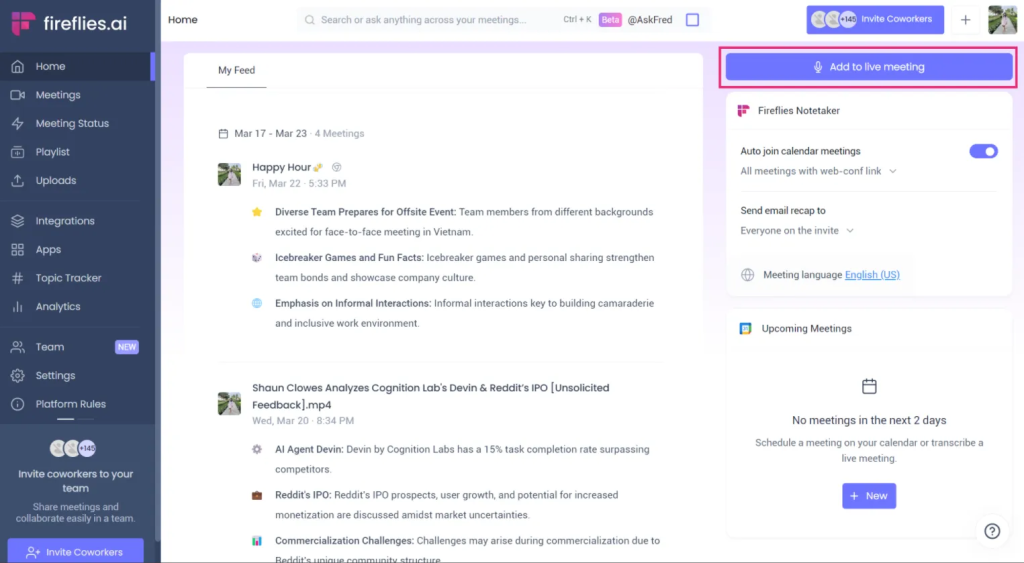
Fireflies.ai is an AI meeting assistant that joins your calls, records the audio, and turns conversations into searchable transcripts and automatic summaries. It connects to tools like Zoom, Google Meet, Microsoft Teams, and your calendar so you can auto-capture meetings without hitting “record” manually. After the call, Fireflies.ai lets you review transcripts, search by keyword, highlight important moments, and share notes with your team. The interface is clean, the learning curve is short, and there is a free plan to test uploads before upgrading for collaboration features.
Fireflies.ai Use Cases:
- Quick meeting documentation – Auto-record sales, CS, or internal calls and get searchable transcripts without manual note-taking.
- Basic follow-up notes – Use AI-generated summaries and key points to remind the team what was discussed and agreed.
- Cross-team visibility – Let teammates review past calls, search by keyword, and skim highlights instead of watching full recordings.
- Training and onboarding – Build a library of real call examples for new reps or team members to learn from.
Fireflies.ai Limitations and Pain Points
Limited free plan
The free tier is useful for quick tests, but it caps uploads and restricts advanced features. You will hit limits fast if you run frequent client calls or want deeper collaboration. Most teams evaluating Fireflies.ai end up needing a paid plan just to keep basic workflows smooth.
Delay in bot joining meetings
The recording bot can join late, missing early context or intros. That gap often leads to incomplete transcripts and weaker summaries. For high-stakes calls, those missed minutes can mean lost commitments and unclear next steps.
Video recording on Pro only
Full video recording is locked behind the Pro plan. If you need a visual record for coaching, demos, or compliance, the free tier won’t cut it. This creates friction for teams trying to pilot with real use cases before committing budget.
Complex pricing structure
Fireflies.ai charges for every invited member, even view-only participants. On top of that, certain actions like applying templates or using the AskFred chatbot can incur additional costs. Total price can climb quickly as your team and usage grow.
Poor multilingual transcription
Quality drops off in many non-English languages, with misheard names, jargon, or domain terms. This creates rework for global teams and risks incorrect follow-ups. If you regularly run multilingual calls, expect to proof and edit more.
Basic conversation intelligence and no coaching depth
Fireflies.ai offers sentiment and talk time, but lacks deeper analytics like talk tracks, competitor mentions, call scoring, or guided coaching. Managers get less signal on deal health and rep behavior. It is more recorder than revenue intelligence.
Summary quality is context dependent
AI summaries are only as good as the captured audio and structure provided. Without clear prompts or templates, important nuance can be missed or misinterpreted. Most teams still need a quick human pass before sharing externally.
Fireflies.ai Top Alternatives
When Fireflies.ai starts to feel limiting – whether it’s automation, client experience, or analytics – you don’t have to rebuild your workflow from scratch. Several tools now offer stronger call recording, smarter AI summaries, or better fit for specific teams like agencies, revenue orgs, or solo founders. Below are the top Fireflies.ai alternatives to consider, depending on what you’re trying to improve first.
1. FuseBase
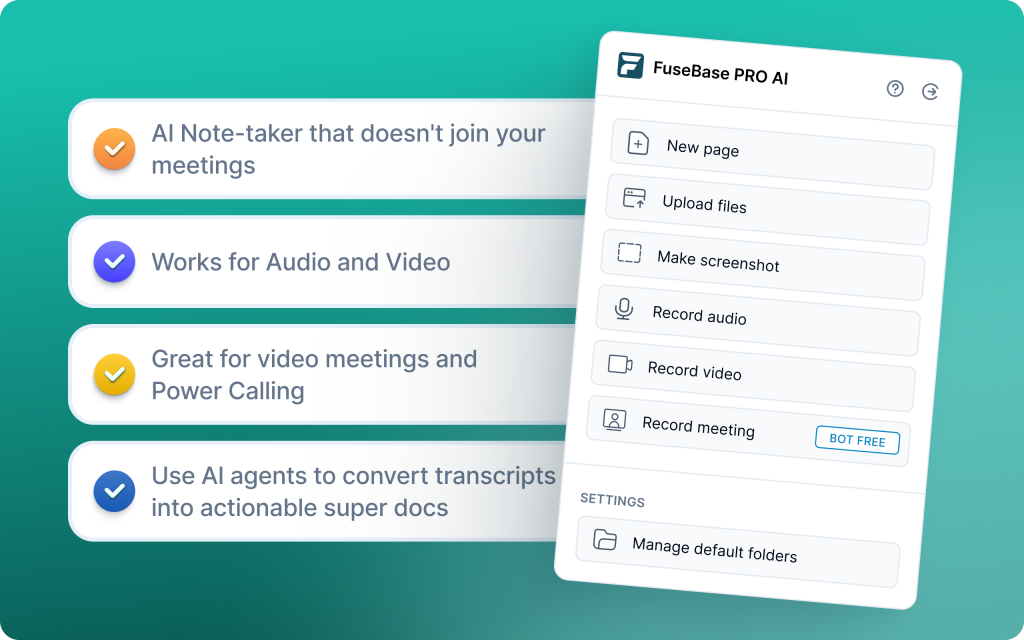
FuseBase is a bot-free AI meeting recorder and workspace that turns every Zoom, Teams, or Meet call into a branded mini-room with recap, decisions, next steps, and all supporting assets. Instead of a naked transcript link, you share a guided, white-label space under your domain that clients can revisit like a Netflix-style hub. AI agents watch calls for risks, opportunities, and follow-ups, then auto-create tasks, populate trackers, and trigger workflows in your CRM or project tools. Dashboards surface patterns like calls with no next meeting, scope creep, or renewal risk so leaders can act fast.
FuseBase Use Cases:
- Discovery and demos – send-ready client recap plus internal risks and next steps in one mini-room
- Onboarding and QBRs – consistent white-label rooms with agendas, decisions, and supporting docs
- Renewals and expansions – trackers flag renewal risk, budget gaps, or missing next meeting
- Professional services delivery – scope control, file handoffs, and task automation tied to each call
- Partner and channel enablement – reusable rooms for joint selling with assets, recap, and follow-ups
2. MeetGeek
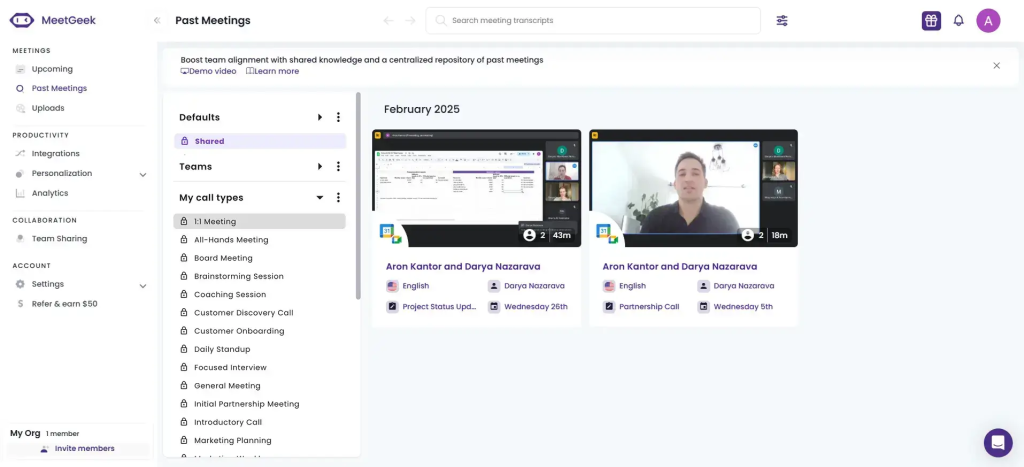
MeetGeek is an organized meeting assistant that records, transcribes, and summarizes both online and offline meetings, including pre-recorded files. It supports 20-50 languages and layers in analytics like sentiment and performance metrics. With 2,000+ integrations plus templates, folders, highlights, and timestamped sharing, teams get structured, send-ready recaps with minimal setup.
MeetGeek Use Cases:
- Sales calls – instant, timestamped recaps with highlights and auto-distribution to team inboxes
- Weekly team meetings – standardized templates and folders for consistent notes across sessions
- Customer 1:1s – sentiment and performance analytics to spot risks and coaching moments
- Pre-recorded reviews – upload files for accurate transcription and quick summary generation
3. tl;dv
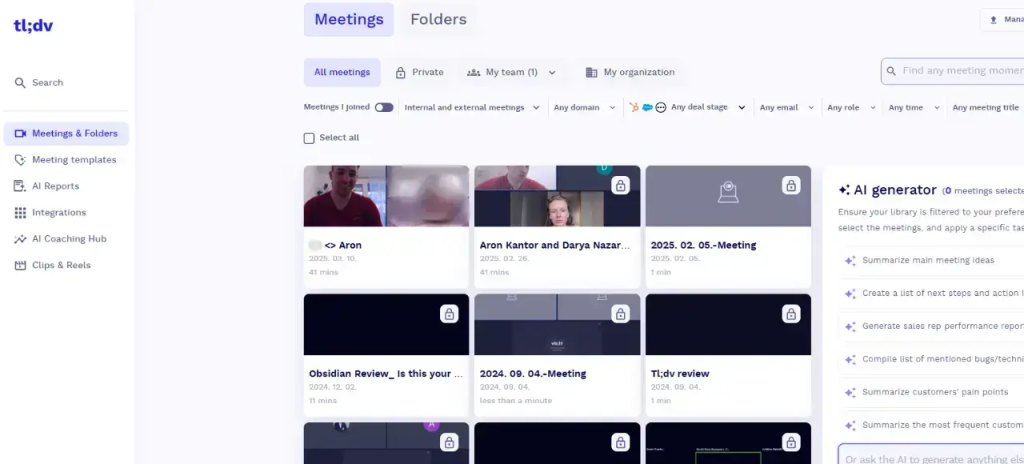
tl;dv is a researcher-friendly AI notetaker that records and transcribes meetings across Zoom, Google Meet, and Microsoft Teams, then layers AI summaries, follow-up emails, and CRM updates. It excels at tagging, timestamped highlights, and a searchable recording library, making it easy to turn multiple sessions into themes and decision-ready insights. Multi-meeting intelligence sends digest reports so teams can see patterns without replaying hours of calls.
tl;dv Use Cases:
- User interviews and product research – tag insights, timestamp highlights, and roll up patterns across sessions
- Cross-functional workshops – assign action items, comment in-thread, and share recaps with stakeholders
- Trend reporting – auto-generate digest reports from multiple meetings for PMs and leadership
- Knowledge repository – organize recordings into team libraries for quick retrieval and onboarding
4. Avoma
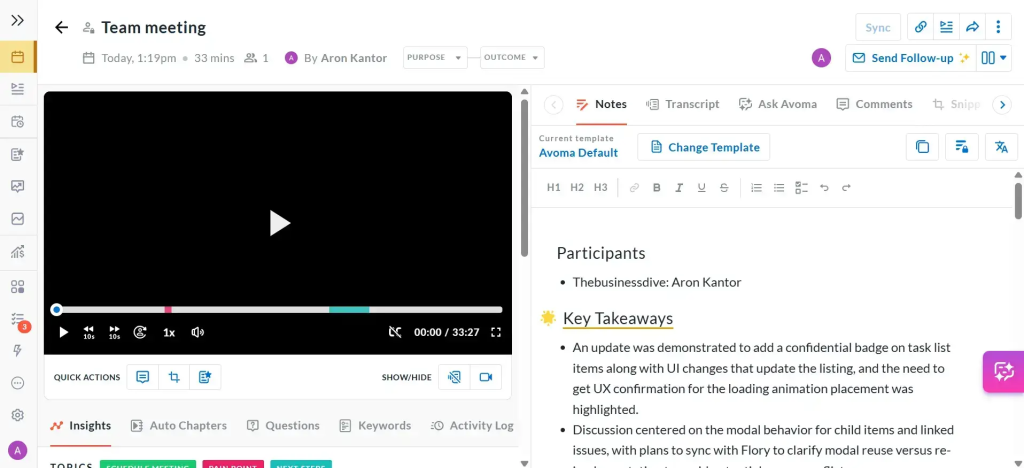
Avoma automates the full meeting lifecycle, from scheduling and real-time transcription to AI notes with action items and instant CRM updates. It chapters conversations, pushes summaries and tasks to Salesforce or HubSpot, and layers in deal intelligence and coaching frameworks. With built-in AI forecasting and trend analytics, teams get faster reviews and earlier visibility into pipeline risk.
Avoma Use Cases:
- Sales and CS reviews – chaptered summaries, action items, and CRM sync to cut recap time to minutes
- Pipeline health – AI forecasts and red flag tracking to spot stalled deals early
- Coaching at scale – call scoring and framework mapping for rep development and consistency
- Scheduling and handoffs – round-robin routing plus Slack and CRM exports to reduce admin
5. Read.ai
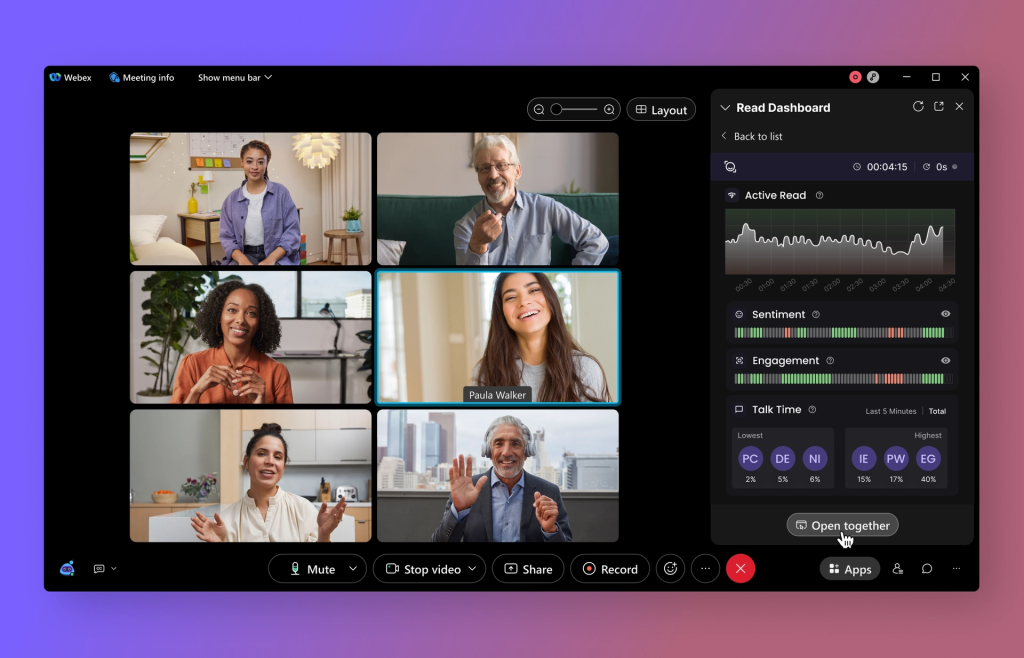
Read.ai is built for enterprises that want call recording and AI summaries enriched with analytics, sentiment, and engagement signals. A meeting bot delivers concise recaps with highlights, while speaker coaching improves clarity, talk-time balance, and filler-word usage. Cross-team search and a robust insights dashboard unify transcripts, email, chat, and docs so leaders can spot bottlenecks and align decisions at scale.
Read.ai Use Cases:
- Executive and cross-functional reviews – sentiment/engagement overlays and dashboards to pinpoint bottlenecks across teams
- Compliance and coaching – speaker analytics and structured summaries to improve behavior and documentation
- Enterprise knowledge retrieval – Search Copilot answers questions across transcripts, email, chat, and docs
- Asynchronous alignment – bot-generated summaries and cross-platform recaps from Gmail, Outlook, Slack, and Teams
6. Otter.ai
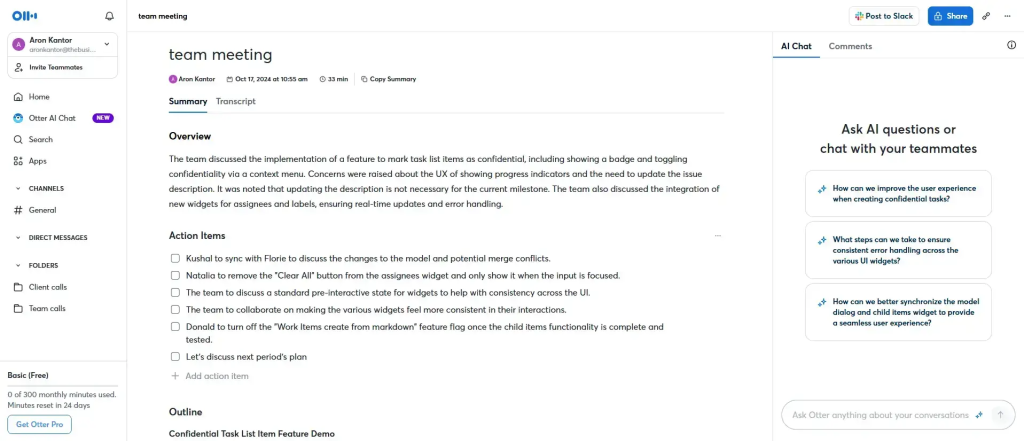
Otter.ai delivers live transcription with speaker IDs and timestamps across Zoom, Google Meet, and Microsoft Teams, then generates concise summaries with key takeaways and action items. Teams can collaborate directly inside transcripts with comments and assignments, and at the same time, slide capture syncs shared decks to the timeline for richer context.
Otter.ai Use Cases:
- Sales and client calls – real-time captions, instant summaries, and quick action item assignment
- Team meetings and standups – slide capture and searchable archive for decisions and owners
- Interviews and research – speaker labeling, highlights, and cross-device review
- Training and webinars – live captions plus summary exports for async enablement
7. Fathom
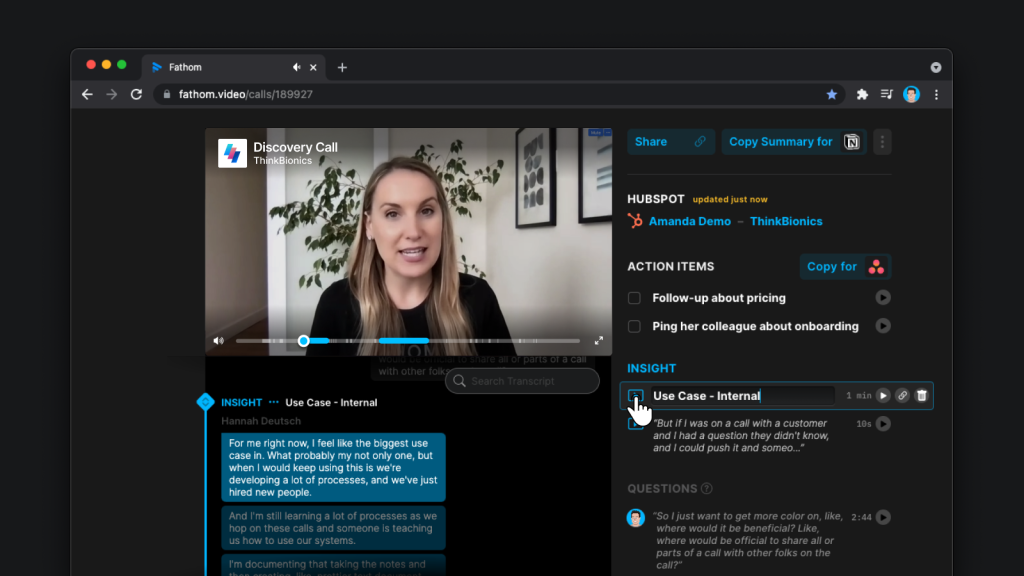
Fathom records, transcribes, and auto-summarizes Zoom, Google Meet, and Teams calls. It pushes AI insights straight into Salesforce, HubSpot, or Close so reps skip manual logging. You get clean, timestamped recaps with key points and to-dos right after the meeting, plus one-click highlights to tag next steps during demos. It also drafts follow-up emails and task reminders, shares snippets to Slack and Notion, and supports 25+ languages for global teams.
Fathom Use Cases:
- Live demos and discovery – one-click highlights, instant summaries, and CRM sync to capture next steps
- CS check-ins – send-ready recaps with action items and reminders to keep accounts on track
- Founder or AE ops – fast follow-up emails and tasks without tab-switching after calls
- Remote teams – multilingual coverage and Slack/Notion sharing for async alignment
Conclusion: Finding the Best Fireflies.ai Alternative for Your Needs
If your priority is dependable capture plus send-ready summaries, pick based on how quickly calls turn into outcomes. Focus first on recording reliability – bot-free or guaranteed on-time joins so you never miss context. Then assess whether the AI summary is send-ready: a clean external recap with clear action items, owners, and dates that needs minimal editing. Ensure CRM and workflow syncing is automatic so notes and tasks land in Salesforce/HubSpot and project tools without copy-paste. Look for an internal vs external split to keep client-facing recaps separate from risks, coaching, and to-dos. Consider brand and experience by sharing on your own domain with consistent, white-label pages.
Quick guide:
- Need client-ready rooms + real workflows: FuseBase
- Organized summaries + broad integrations: MeetGeek
- Research tagging + trend digests: tl;dv
- End-to-end lifecycle + coaching/forecasting: Avoma
- Enterprise analytics + cross-team search: Read.ai
- Transcription-first with solid basics: Otter.ai
- Fast summaries + CRM push, light setup: Fathom