Great meeting notes are only useful if they turn into clear next steps. If you’re looking for a tool that goes beyond documentation – connecting notes to tasks, owners, and timelines – there are several Fellow alternatives that do it better depending on your team’s style. This article focuses on platforms designed to keep everyone aligned: shared agendas, decision logs, action items, and integrations that push follow-ups into the tools your team already uses. Ahead, we’ll cover top alternatives for meeting notes, task tracking, and team alignment, and highlight which options work best for managers, cross-functional teams, and fast-moving projects.
Quick Summary of Top Fellow Alternatives
- FuseBase – Best for teams that want meeting outcomes tied to shared workspaces, docs, and client/project collaboration.
- Granola – Best for people who prefer taking their own notes, with AI turning them into clean summaries and action items.
- Supernormal – Best lightweight option for automated meeting notes with minimal setup and fast sharing.
- Fireflies.ai – Best for searchable meeting transcripts, topic tracking, and building a meeting knowledge base.
- Read.ai – Best for AI summaries plus meeting analytics (engagement, productivity signals, and trends).
- Gong – Best for sales and revenue teams that need deal intelligence, coaching insights, and conversation tracking.
- Otter.ai – Best for real-time transcription and “ask your meetings” workflows to quickly find details later.
- Avoma – Best all-in-one for AI meeting notes plus deeper insights and conversation intelligence across teams.
What is Fellow?
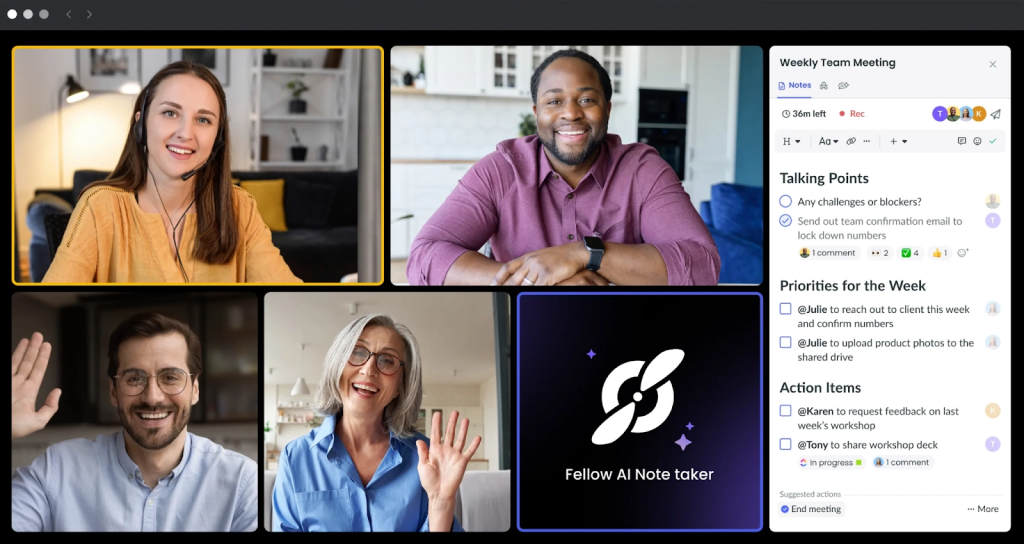
Fellow is a calendar-driven meeting workspace that brings structure and accountability to every conversation. It plugs into Google and Microsoft calendars to “turn on” the right notes at the right time, so agendas, context, and previous action items are waiting when the meeting starts. Teams co-create agendas, take collaborative notes, and capture decisions in one place, while the AI assistant generates summaries and follow-ups to keep momentum after the call. Because notes are tied directly to recurring meetings and projects, Fellow preserves continuity across standups, 1:1s, QBRs, and cross-functional check-ins. It’s built for managers and cross-functional teams that want predictable meeting hygiene – consistent templates, clear owners, and a shared record of decisions – without moving into a full project management tool.
Pros
- Calendar-native workflows with real-time note activation
- Collaborative agendas and reusable templates for consistent meetings
- AI assistant for summaries and follow-ups
- Notes anchored to recurring meetings or projects for easy continuity
- Works with Google Meet, Zoom, Microsoft Teams, Slack, and more
- Supports 10 languages for global teams
Cons
- Free plan is limited (AI notes, recording/transcription caps)
- Focused on meeting hygiene; light beyond basic action items for project management
- Limited integrations compared to broader work hubs
- Lacks deep analytics on meeting quality or trends
- Not built for sales intelligence or revenue coaching
Top 8 Fellow Alternatives
While Fellow is a popular choice for agendas and action items, it isn’t the perfect fit for every team, especially if you need stronger task tracking, deeper integrations, better async alignment, or more flexible ways to organize meeting knowledge. Below are the top 8 Fellow alternatives built for meeting notes, tasks, and team alignment.
1. FuseBase
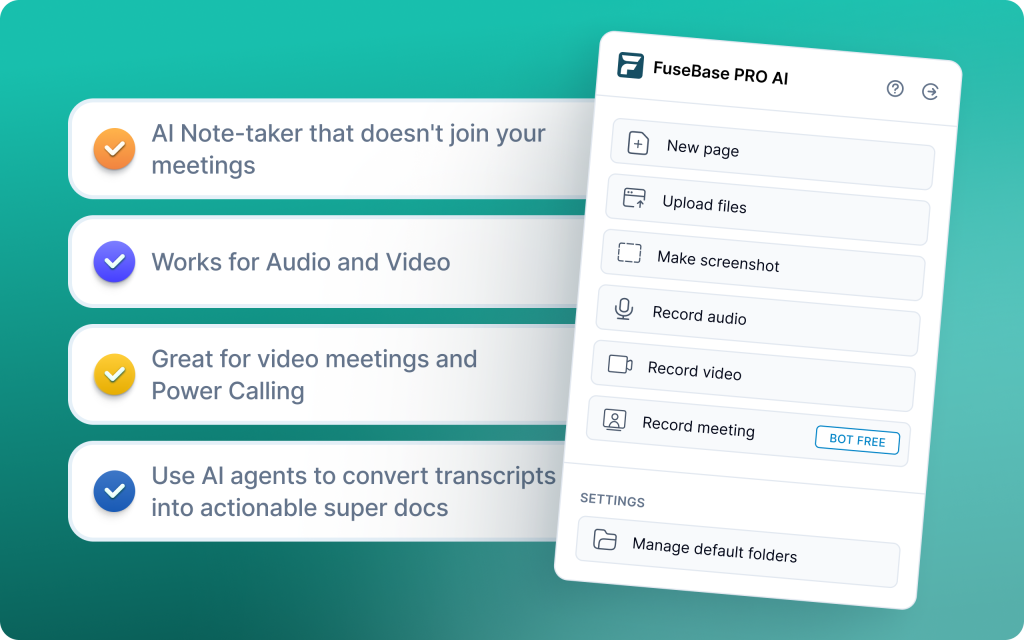
FuseBase is a bot-free AI meeting recorder and workspace built to keep clients, not just close deals. It turns every Zoom, Teams, or Meet call into a branded mini-room with recap, decisions, next steps, and supporting assets. Client-facing stakeholders get a polished recap inside a Client Portal or Deal Room, while advanced AI Agents keep internal risk flags, coaching notes, and sensitive details private. FuseBase’s meeting intelligence fuels delivery: it detects scope creep and unbilled requests, auto-creates tasks and trackers, and can automatically schedule a save-the-deal meeting. The result: aligned teams, visible owners, and faster follow-through across the account.
Pros
- Strong AI automation and flexible workspaces
- Automatic separation of internal coaching notes from client-facing content
- Client Portal and Deal Room outputs instead of raw links
- AI Agent detects scope creep and unbilled requests to protect margins
- Trackers for real business signals (no next meeting, renewal risk, repeated objections)
Cons
- Not designed for cold calls or deep sales rep coaching
- Overkill for very small teams
2. Granola
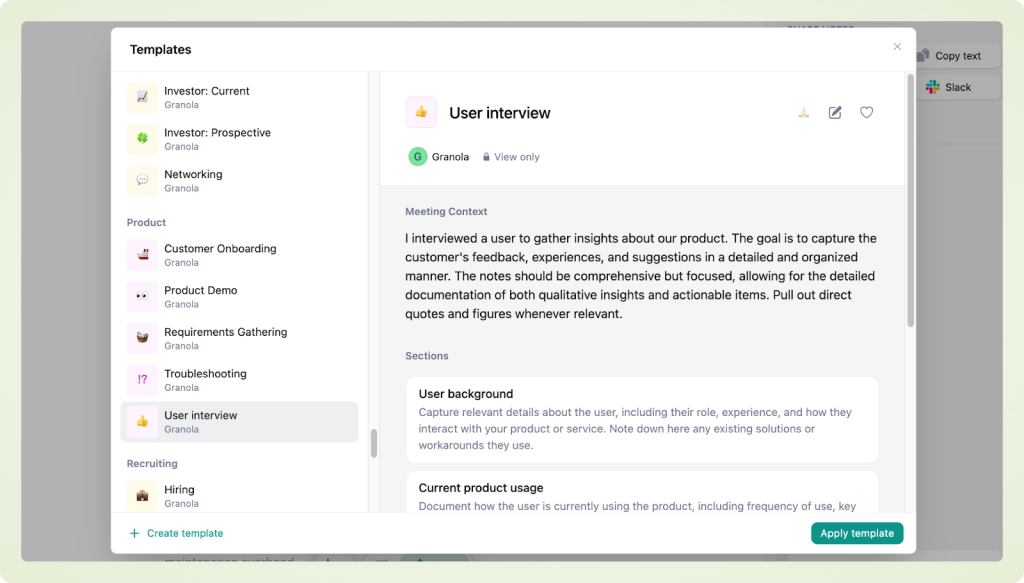
Granola is a lightweight, privacy-first, bot-free AI notepad that runs quietly on your device to enhance the notes you already take. Instead of relying solely on automated transcripts, it uses real-time, on-device transcription and AI to structure, summarize, and enrich your notes into clear takeaways and action items. Built for Mac (now on Windows), Granola adds AI chat for quick answers, customizable templates, calendar context, and team folders for shared knowledge – delivering fast, private, actionable meeting documentation without bots or browser add-ons.
Pros
- True bot-free experience with a native, privacy-first app
- AI-enhanced, customizable notes and instant sharing
- Team folders, calendar integration, and option to opt out of AI training
- Works across any meeting platform by capturing device audio
- Familiar notepad feel with near-instant summaries post-meeting
Cons
- No video recording or speaker identification
- Some users report search limitations for finding specific meetings or details
3. Supernormal
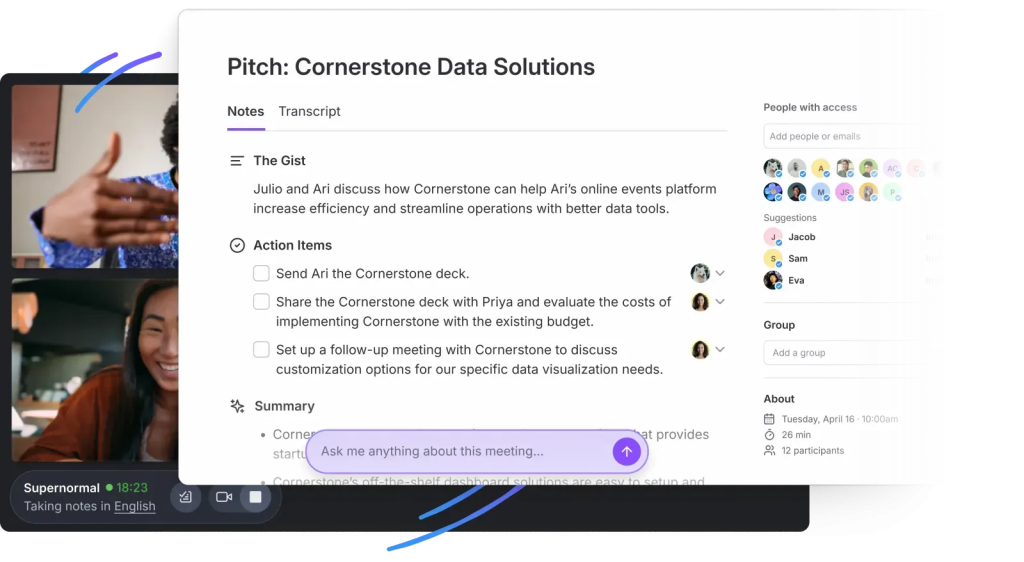
Supernormal turns meetings into standardized, decision-focused documentation using AI and templates. It auto-generates notes that capture actions, owners, decisions, and follow-ups in consistent formats, then pushes them into your daily tools so teams can execute immediately. Built for teams that want notes to reflect their workflow (not the other way around), Supernormal lets you design custom summary templates, organize by topics or groups, and leverage a real-time AI assistant for clarification on the fly.
Pros
- Template-based notes that match your team’s style for consistent, repeatable outcomes
- Automatic action item detection and assignment into existing tools
- Real-time AI assistant for instant answers and highlights
- 60+ language support and broad integrations (Salesforce, HubSpot, Notion, Asana, Trello, Google Docs, Slack)
Cons
- Requires a bot to join meetings, no in-person or bot-free capture option
- Some advanced features and integrations are limited to higher-tier plans
4. Fireflies.ai
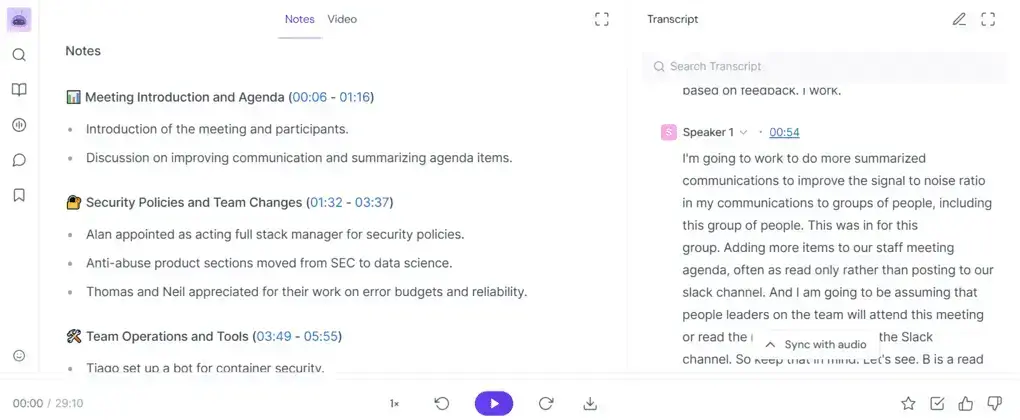
Fireflies.ai is a simple, affordable AI notetaker that records and transcribes meetings across Zoom, Teams, and Google Meet, then auto-creates summaries and logs key points to CRMs. It emphasizes fast, org-wide capture and a searchable call library over deep coaching or forecasting. With 60+ language transcription, speaker IDs, shareable soundbites, and broad integrations, Fireflies helps teams document decisions and follow-ups with minimal setup and a short learning curve.
Pros
- Platform-agnostic capture with wide integrations (CRMs, PM tools, Slack, Notion)
- Quick to deploy at scale; little to no training required
- Searchable conversation history with tags, filters, and soundbites
- Customizable summary templates and collaboration features (comments, pins)
- Mobile apps and file upload transcription for existing recordings
Cons
- No coaching or guided enablement; limited strategic depth for rep development
- Summary quality can miss nuance without structure or human review
- Bot may join meetings late on occasion
5. Read.ai
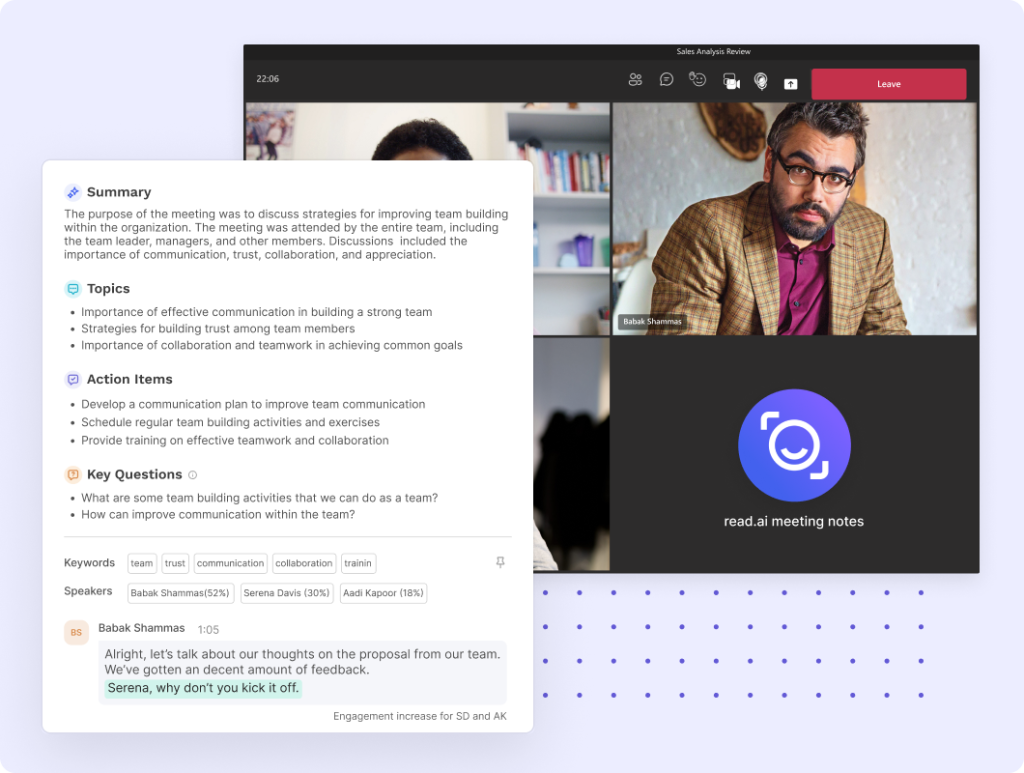
Read.ai is an enterprise-focused meeting intelligence platform that records Zoom, Teams, and Google Meet, generates real-time summaries and sentiment, and unifies conversations across apps. Its cross-team search and meeting insights dashboard bridge silos by pulling answers from transcripts, emails, and chats, so leaders can spot bottlenecks, align faster, and make decisions with data. Speaker Coach provides live coaching on talk-time and clarity, while playback with AI-marked highlights speeds review. Ideal for large or cross-functional orgs that need analytics-first collaboration and conversation tracking at scale.
Pros
- Cross-team search and summaries across Slack, Teams, Gmail, Outlook
- Meeting insights dashboard surfaces trends, bottlenecks, and engagement
- Real-time summaries and sentiment inside Zoom and Teams
- Playback with AI highlights for rapid post-meeting review
Cons
- Bot can auto-join meetings even when not desired
- Free plan is too limited for larger pilots
- Hard to fully remove once connected, which can raise privacy concerns
6. Gong
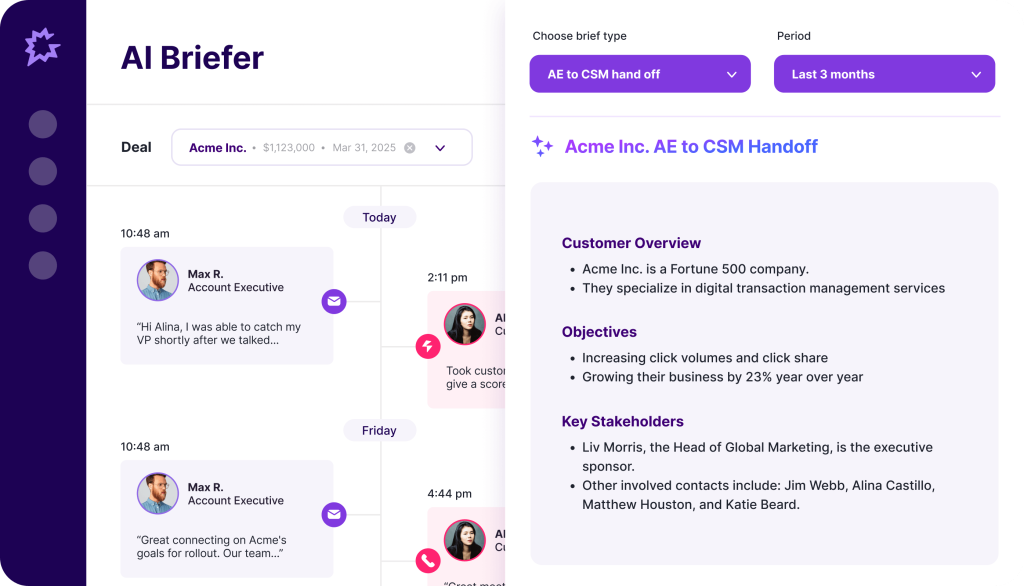
Gong is a revenue intelligence platform that turns sales conversations into actionable insights. It records and analyzes calls, emails, and meetings to surface deal risks, coaching opportunities, and forecast signals so teams can align on next steps with data, not hunches. Call Spotlight adds accurate, user-friendly AI summaries (like highlights, outlines, briefs, and “ask anything” Q&A) while prioritizing data security by avoiding public-facing AI models. Gong syncs summaries and insights directly to your CRM, giving leaders and reps instant context, consistent follow-ups, and tighter pipeline control.
Pros
- Call Spotlight delivers clear highlights, outlines, briefs, and Q&A for fast review
- Deep revenue intelligence for risk detection, coaching, and forecasting
- KPI-aligned dashboards and metric library to standardize coaching and accountability
- Supports 70+ languages for global coverage
Cons
- Search can feel limited for complex queries
- Heavier admin and cost compared to lightweight meeting-note tools
7. Otter.ai
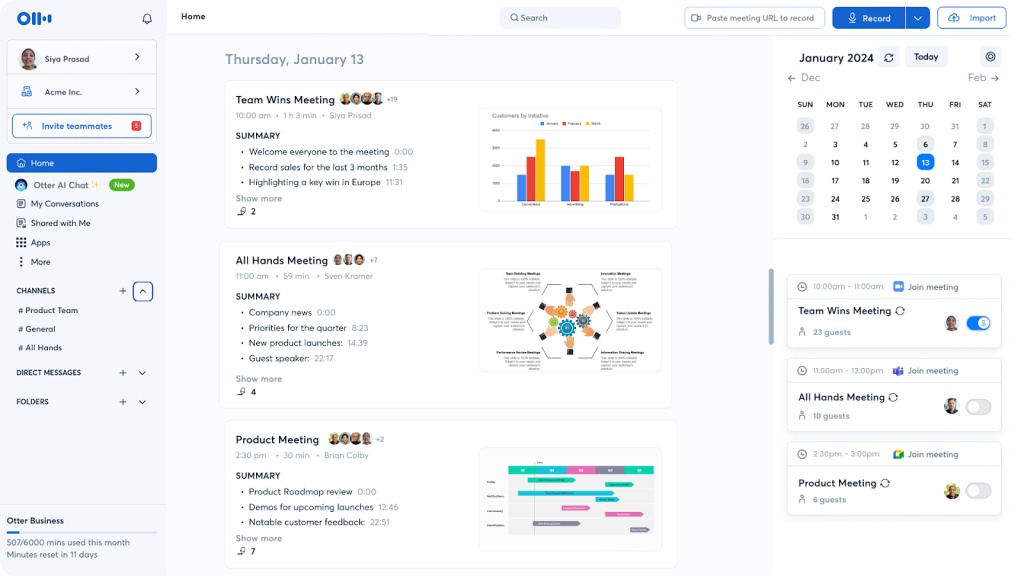
Otter.ai turns conversations into searchable, shareable text in real time so your team can follow along, highlight key points, and keep everyone aligned without manual note-taking. It integrates with Zoom, Google Meet, and Microsoft Teams to auto-transcribe meetings, generate concise summaries, and identify speakers, with an AI chat to answer post-meeting questions. Otter is ideal when you need fast, accurate transcription and a central record of decisions and action items that teams can reference and share.
Pros
- Real-time, accurate transcription with speaker separation
- AI chat to query meetings and extract answers instantly
- Searchable workspace with channels, comments, highlights, and basic task assignment
- File upload transcription for audio and video
- Mobile apps for reviewing and sharing on the go
Cons
- English-first experience; limited multilingual coverage on lower tiers
- No native video recording
- Deeper revenue intelligence limited to enterprise offering
8. Avoma
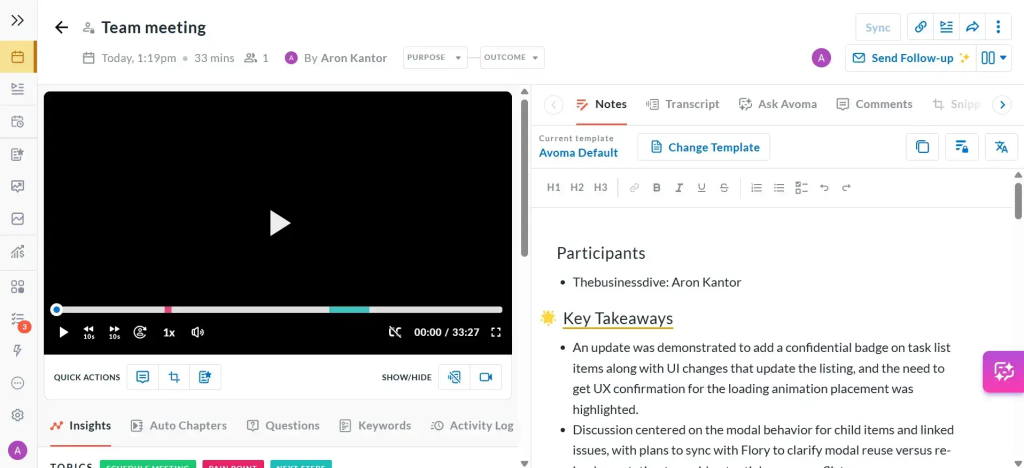
Avoma is an AI meeting assistant that automates the full meeting lifecycle for cross-functional teams. It links agendas to transcripts in one view, transcribes in real time across 40+ languages, and generates structured AI notes with clear action items. Sales, CS, and product teams use Avoma to capture insights, assign next steps, and sync updates straight to Salesforce or HubSpot so nothing gets lost in handoffs. You also get chaptered conversations, trend analytics across internal/external meetings, and scheduling for round-robin or group booking.
Pros
- Agenda-to-transcript synchronization in a single, unified view
- Cross-functional collaboration with comments, highlights, and shared snippets
- Real-time transcription in 40+ languages with chaptered conversations
- Meeting trend analytics to surface patterns and risks across teams
- Flexible sharing to Slack, CRM, and internal docs; easy to pilot with a free tier
Cons
- Generic CI compared to sales-first platforms; limited objection tracking or deal risk depth
- Minimal coaching features for structured rep development
- Assistant can join late; speaker labeling may need tuning
Conclusion
Choosing the right Fellow.app alternative comes down to one thing: how well it turns meeting conversations into consistent execution. Some tools specialize in fast AI summaries, others focus on transcription, and a few are built mainly for revenue intelligence – but if your goal is stronger meeting notes, task follow-through, and team alignment, you’ll get the most value from a platform that connects everything in one place.
That’s why FuseBase stands out as the best solution. It goes beyond capturing what was said and helps your team organize the work that happens next – linking meeting outcomes to shared spaces, documentation, and ongoing collaboration. Instead of letting action items live in scattered tools and forgotten notes, FuseBase keeps decisions, owners, and context together so teams stay aligned long after the call ends.
If you want a tool that doesn’t just document meetings but actually improves how your team plans, collaborates, and delivers, FuseBase is the strongest Fellow alternative to start with.